Changelog

Follow new updates and improvements to ReactIn.

Changelog #15 | ReactIn is now on Claude. Talk to your outreach ๐Ÿคฏ


Hey GTM Experts ๐Ÿ’™

This one's different. This isn't a new button or a new filter.

This changes how you use ReactIn entirely.

๐Ÿ‘‡


ReactIn MCP is LIVE ๐Ÿ”Œ

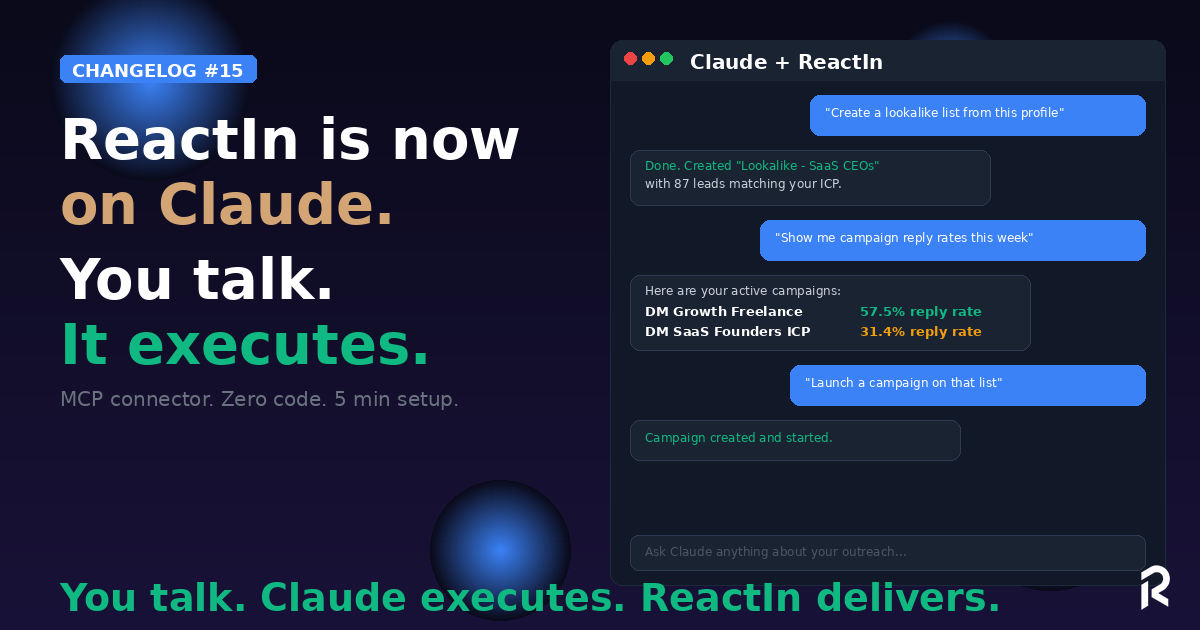
You can now connect ReactIn to Claude. Directly.

No code. No API calls. No dashboard tab-switching.

You talk. Claude executes.

"Create a lookalike list from this LinkedIn profile." โœ…

"Show me my active campaigns and their reply rates this week." โœ…

"Add these 15 profiles to my SaaS Prospects list." โœ…

"Which job titles replied the most this month?" โœ…

You describe what you want in plain English (or French, or any language). Claude reads your ReactIn data, calls the right tools, and does the work.


How it works

5 minutes to set up. Zero code.

  • Open Claude (web, desktop, or mobile)

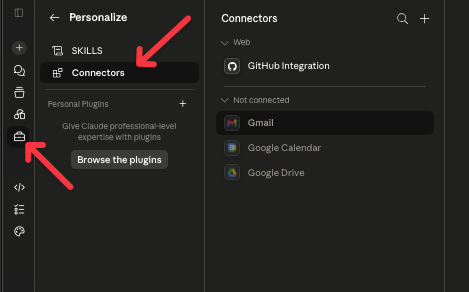
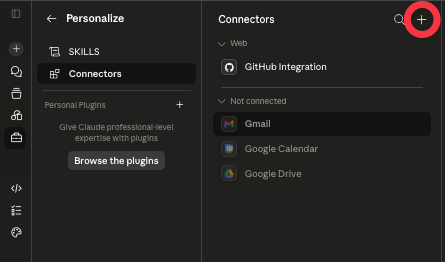
  • Go to Settings โ†’ Connectors

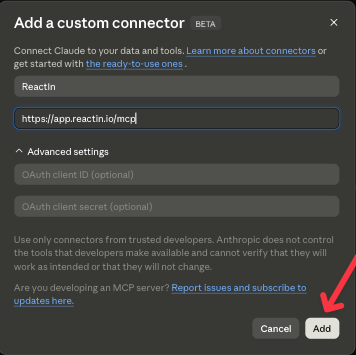
  • Click +, enter ReactIn as the name and https://app.reactin.io/mcp as the URL

  • Click Connect, then Authorize on the ReactIn screen
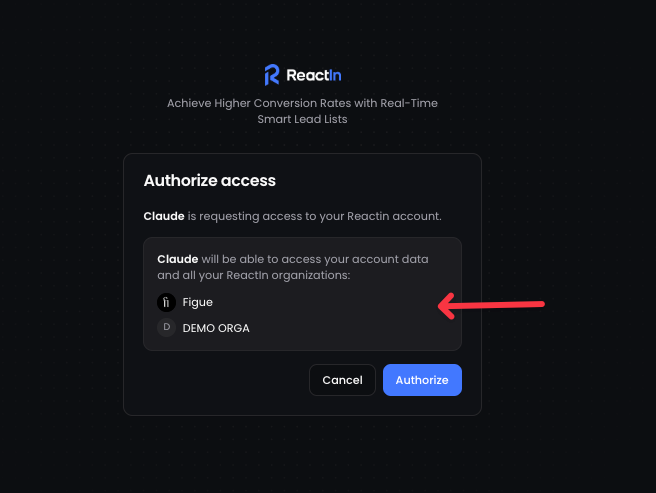
  • Done. Start talking.

That's it. Your entire ReactIn account is now accessible from Claude.


What you can do

Here's what's already possible:

Lists & Leads

  • Create any list type (Spyer, Pixel, Lookalike, Search, CSV...)

  • Browse and search your leads

  • Add leads to lists

  • Enrich leads with AI columns

Campaigns

  • Create and configure campaigns

  • Check campaign performance

  • Adjust campaign settings

Analytics

  • Get reply rates, acceptance rates, and message stats

  • Compare campaign performance

  • Identify top-performing job titles, industries, and segments

Organization

  • List your organizations and LinkedIn accounts

  • Check credit usage

  • Monitor account limits

YouTube Tutorial ๐Ÿฟ๐Ÿ‘‡

And this is just v1. We're shipping more tools every week.


Why this matters

ReactIn already automates your LinkedIn outreach.

Now Claude automates your use of ReactIn.

You don't open a dashboard. You don't click through menus. You don't remember which filter goes where. You just say what you need, and it happens.

This is the GTM Coach we teased last month, but running natively inside Claude with full access to your data.


Try it now

๐Ÿ‘‰ Try it now in your dashboard ๐Ÿ’™

๐Ÿ‘‰ Setup guide

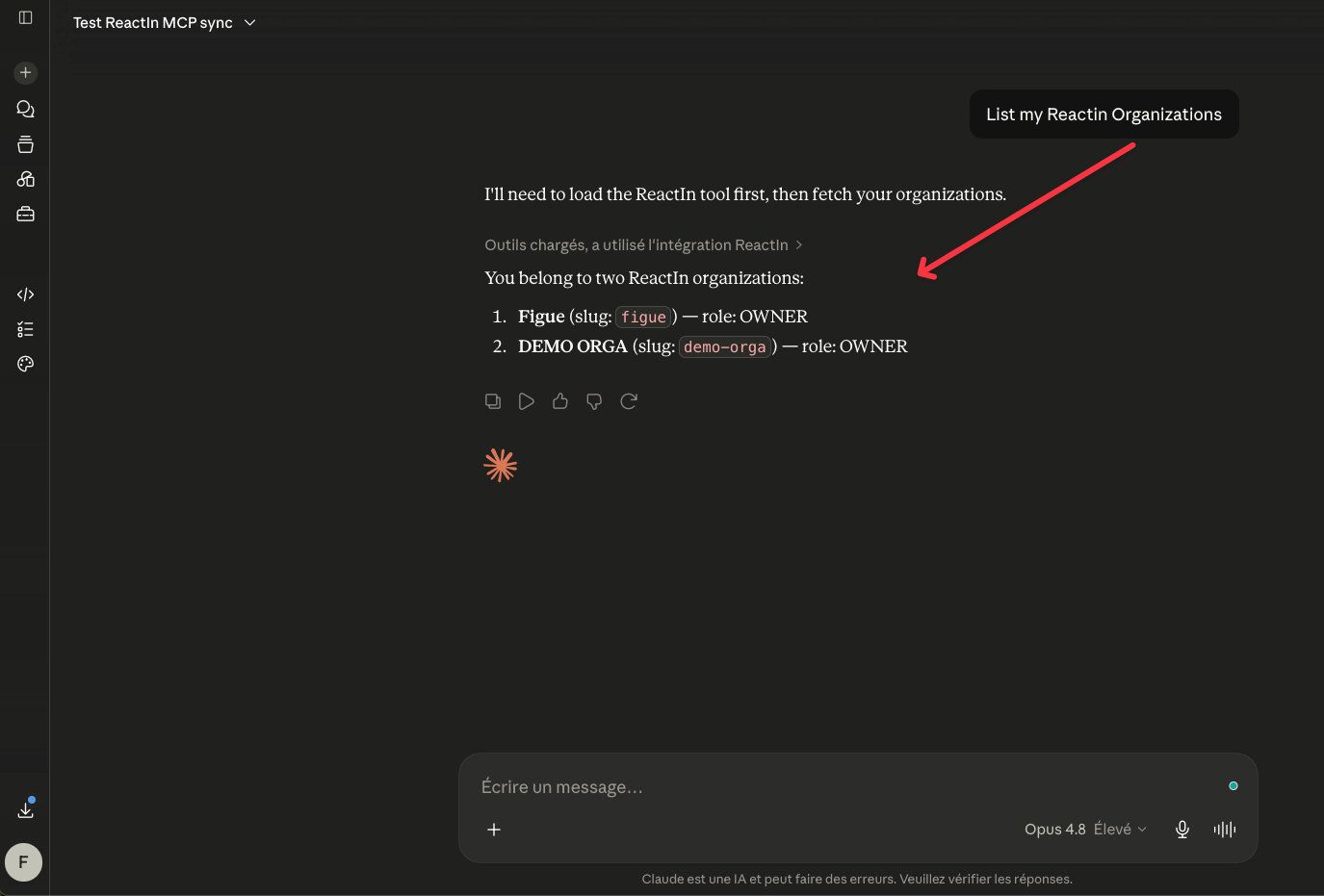
Just ask Claude: "List my ReactIn organizations." If it works, you're live.

Then try: "Create a lookalike list to find profiles similar to linkedin.com/in/[your-best-customer]"

๐Ÿ’™ Show us what you build with it. We'll feature the best workflows.

Franรงois & The ReactIn Team โšก

New

Changelog #14 | Meet your GTM Coach. And 2 brand new scrapers ๐Ÿ”ฅ

Hey GTM Experts ๐Ÿ’™

This one is โ€ฆ ๐Ÿฅต. An AI coach that knows YOUR data, two scrapers that unlock intent signals nobody else has, and a bunch of improvements you've been asking for.

Let's go ๐Ÿ‘‡


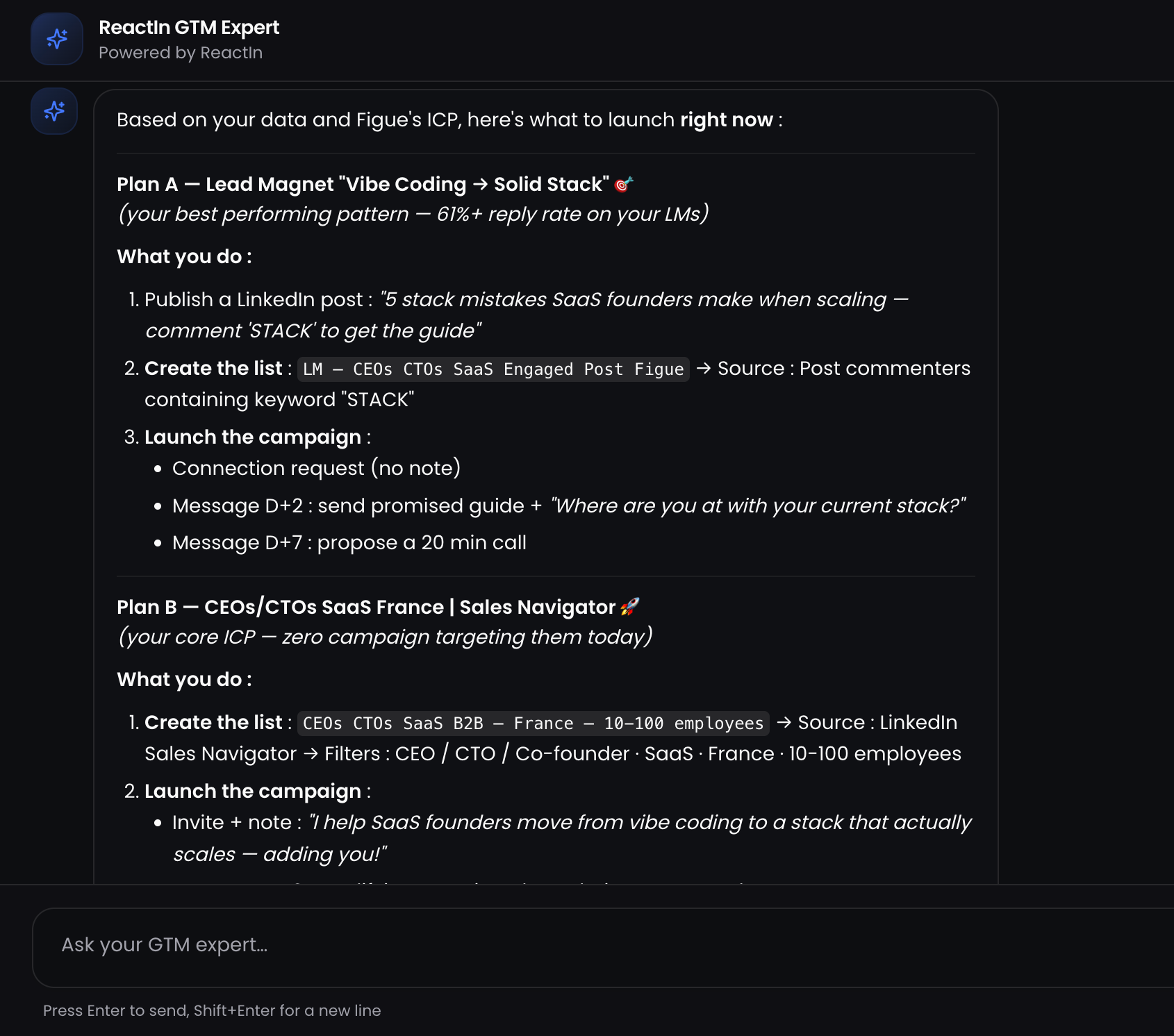
1๏ธโƒฃ NEW: The GTM Coach ๐Ÿง 

ReactIn now has a built-in AI expert, connected to YOUR data.

Ask it anything:

  • "What list should I create next?"

  • "Which campaign is underperforming?"

  • "What's the best approach for my ICP?"

  • "Help me set up my Lead Magnet distribution."

It analyzes your lists, campaigns, and analytics and gives you actionable plans. Not generic advice. Real recommendations based on what's happening in your account right now.

Meet your own new GTM Coach โšก๏ธ

Who it's for: Founders and growth marketers who know their ICP but don't always know the next move. Agencies onboarding new clients who need a GTM plan in minutes, not days.

The pain it solves: You've got the tool. You've got the data. But connecting the dots between "I want more leads" and "here's the exact list + campaign + message sequence to run" used to take experience. Now the Coach does it for you.


2๏ธโƒฃ NEW Scraper: Company Ads Engagement ๐Ÿ“ข

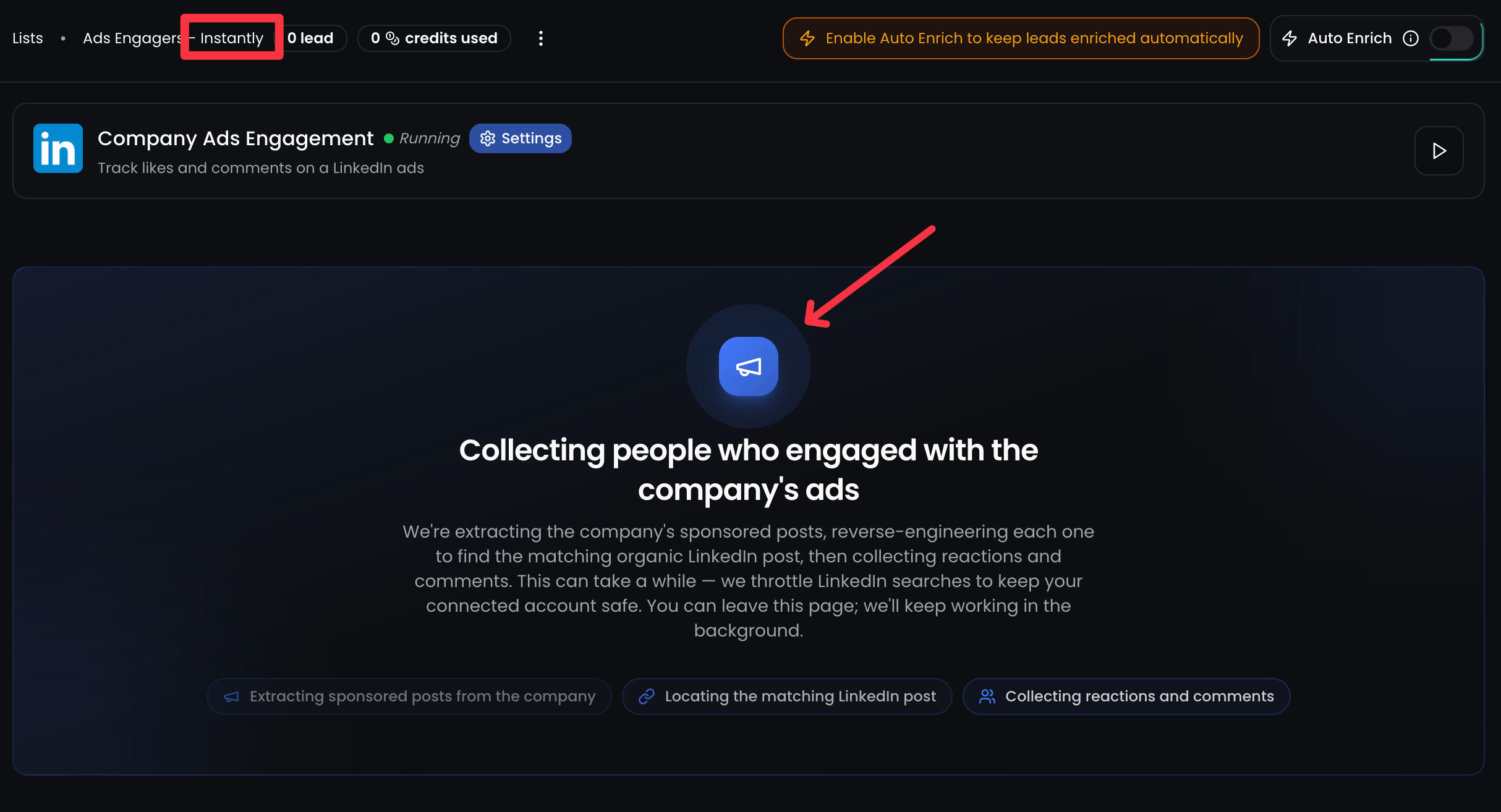
One-time scraping. Add a company, and we extract their LinkedIn sponsored posts, then find every person who engaged with them.

Here's what happens under the hood:

  • We extract the company's sponsored posts

  • Reverse-engineer each one to find the matching organic LinkedIn post

  • Collect all reactions and comments

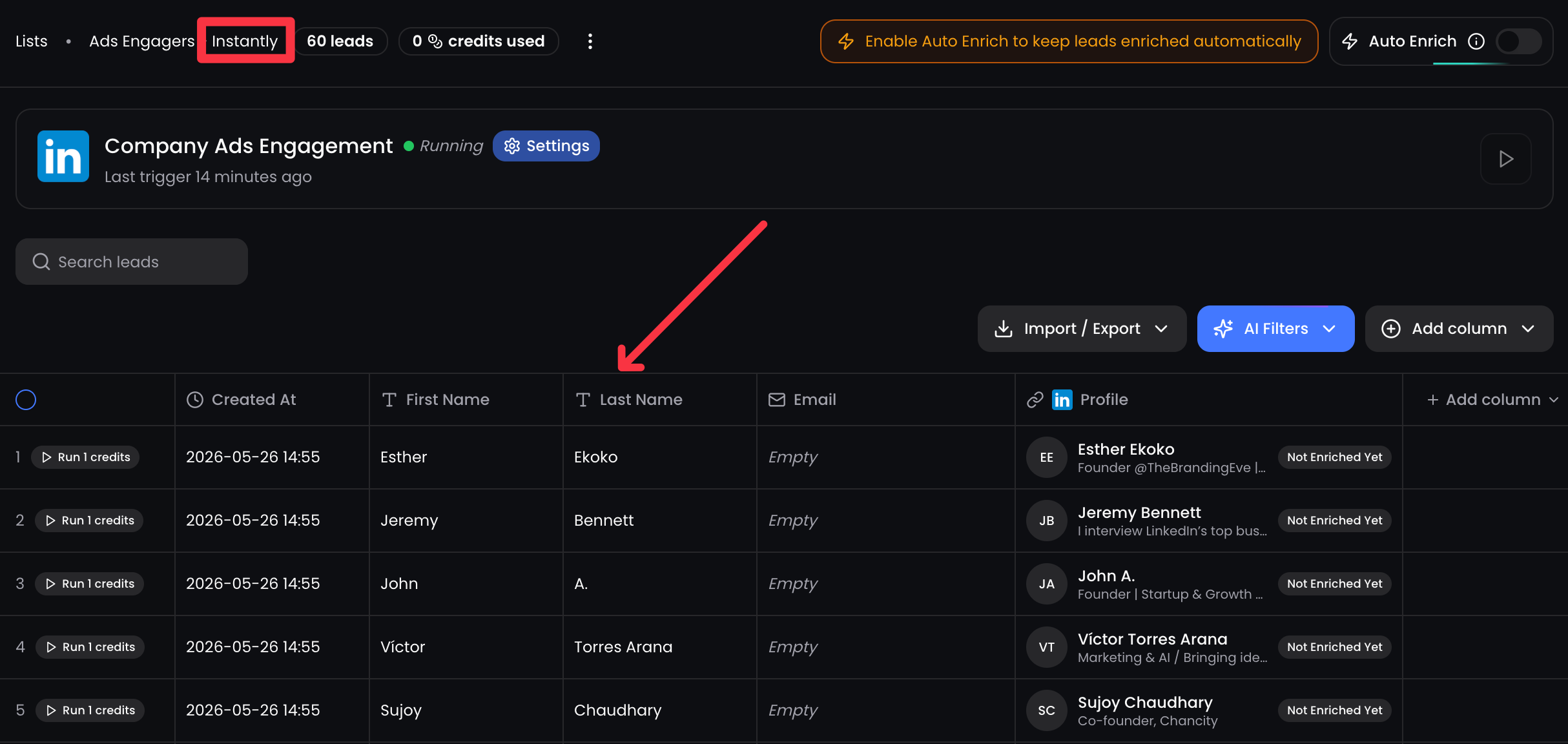
Scrap every LinkedIn Sponsored Posts from your competitors ๐Ÿ•ต๏ธโ€โ™‚๏ธ

This can take a while. We throttle LinkedIn searches to keep your connected account safe. You can leave the page; we keep working in the background.

And get high-intent leads for free ๐Ÿ’ฐ

Who it's for: B2B marketers and sales teams targeting competitors' audiences. Agency prospectors who want to find warm leads already engaging with similar solutions.

The pain it solves: Your competitors are running LinkedIn ads. The people engaging with those ads are your prospects too. Until now, there was no way to find them. Now there is.


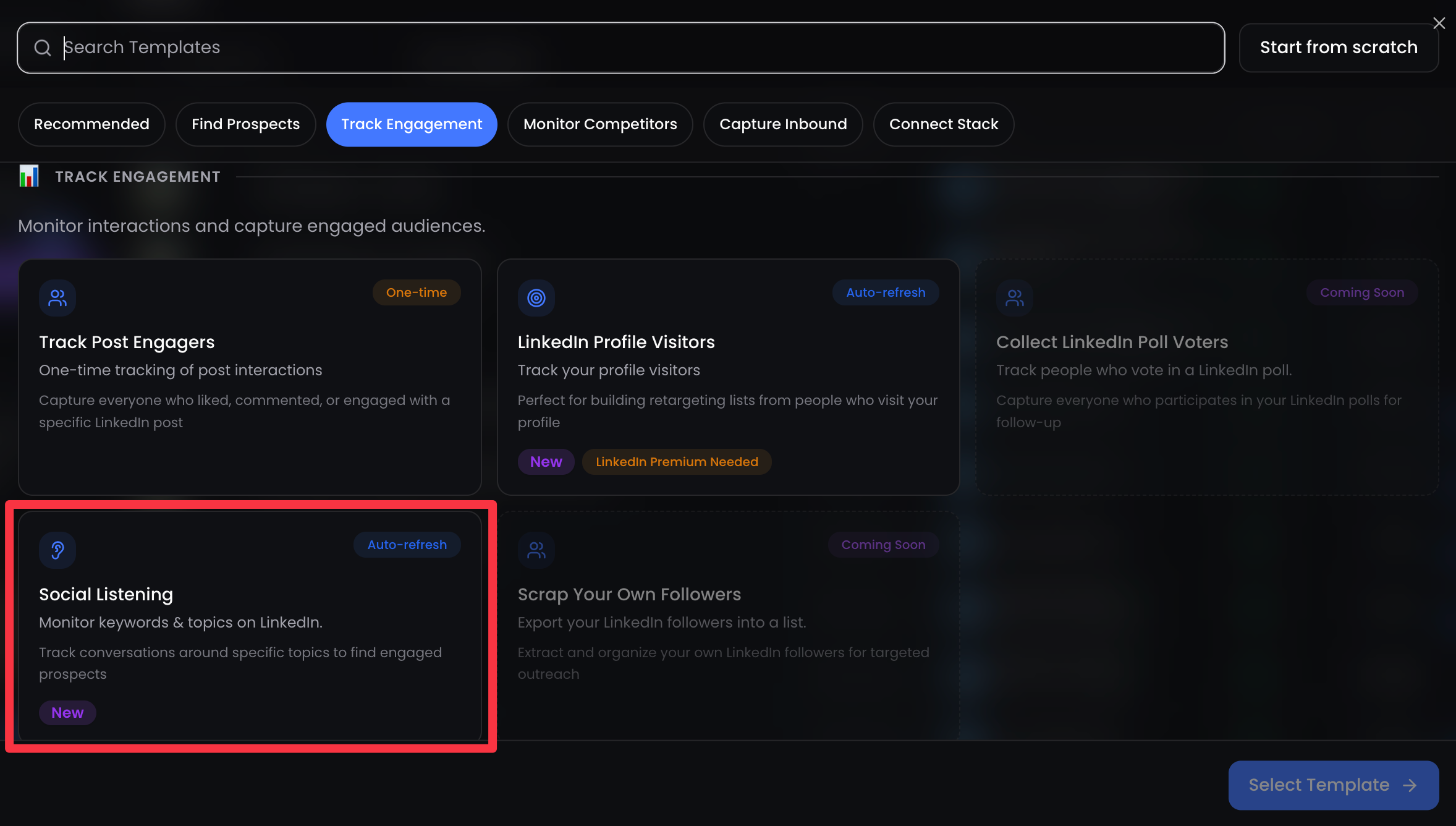
3๏ธโƒฃ NEW Scraper: Social Listener ๐Ÿ“ก

Auto-refresh. Give us keywords, and we'll find LinkedIn posts talking about those topics, then extract all the engagers.

This is ReactIn's secret sauce.

If they like a LinkedIn post about Marketing, they instantly drop into your list ๐ŸŽฃ

You define what matters to your business. ReactIn monitors LinkedIn for conversations about it. Every person who likes, comments, or reacts on a matching post gets added to your list. Automatically. Recurring.

Who it's for: Founders and growth teams who want to capture demand as it happens. SDRs who want to reach out when a topic is hot, not 3 months later.

The pain it solves: Intent signals are everywhere on LinkedIn. People are literally telling you what they care about by engaging with posts. But you can't monitor thousands of posts manually. Social Listener does it for you, 24/7.


๐Ÿ’™ Reminder: Lookalike Leads

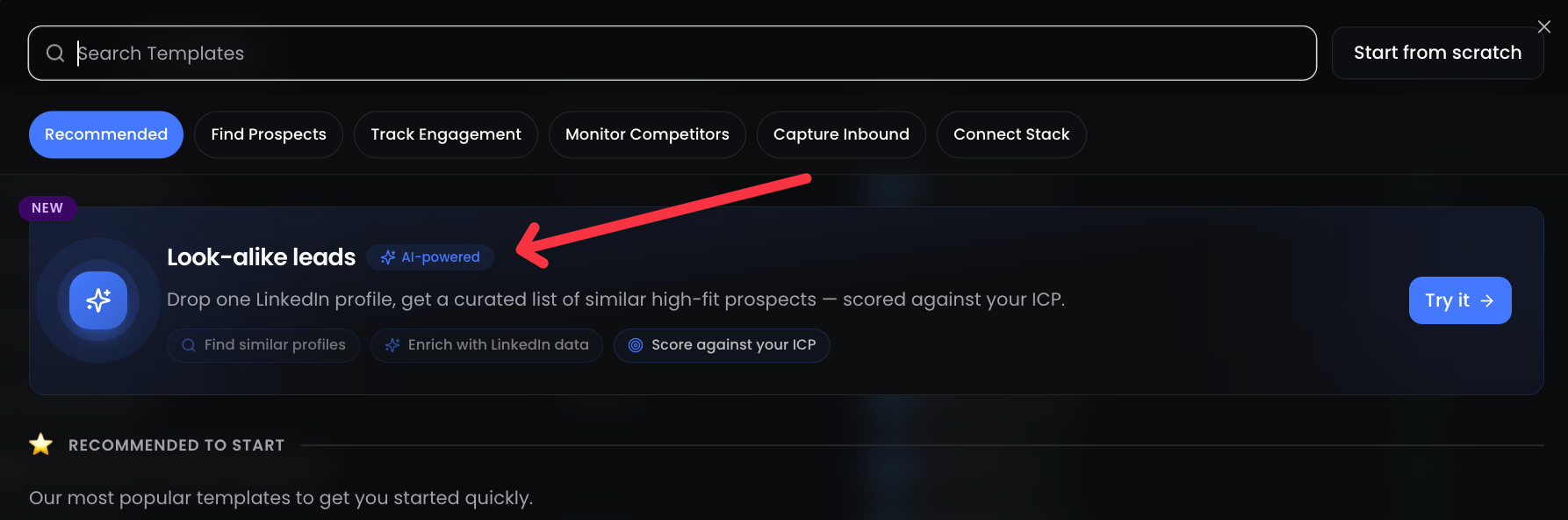
Missed it last month? Our Lookalike scraper lets you paste a LinkedIn profile, describe your ICP and buyer persona, and get up to 100 matching leads. One-time scraping. 2 credits per lead.

If you haven't tried it yet, it's in Lists โ†’ New List โ†’ Lookalike.


โš™๏ธ Other Improvements

  • Enrich only new leads: When enabling Auto Enrich on a list, you can now choose to enrich only newly added leads instead of all existing ones. Save credits. Pay only for what's fresh.

  • API: Inbox Events: The ReactIn API now supports inbox events (messages received and sent). Build AI-powered automations on top of your conversations. Auto-classify replies. Trigger CRM updates. The builders among you will love this one.

  • Accounts Analytics by Campaign: In LinkedIn Accounts โ†’ Accounts Analytics, you can now filter and split your report by campaign. See exactly which campaign drives which results, per account. Export the details as a downloadable report. Agencies, your clients will thank you.


๐Ÿ‘‰ Try it now in your dashboard ๐Ÿ’™ What's the first keyword you're going to listen for?

Franรงois & The ReactIn Team โšก

Changelog #13 | Find leads that look like your best customers

.

Hey GTM Experts ๐Ÿ’™

One month since our last changelog, we don't like spam, we talk when we ship real stuff ๐Ÿ’ช. And good news, we have 3 game-changers for you. This might be our biggest changelog yet.

Let's go ๐Ÿ‘‡


1๏ธโƒฃ NEW Scraper: Lookalike Leads ๐ŸŽฏ

This is the one we've been teasing for months.

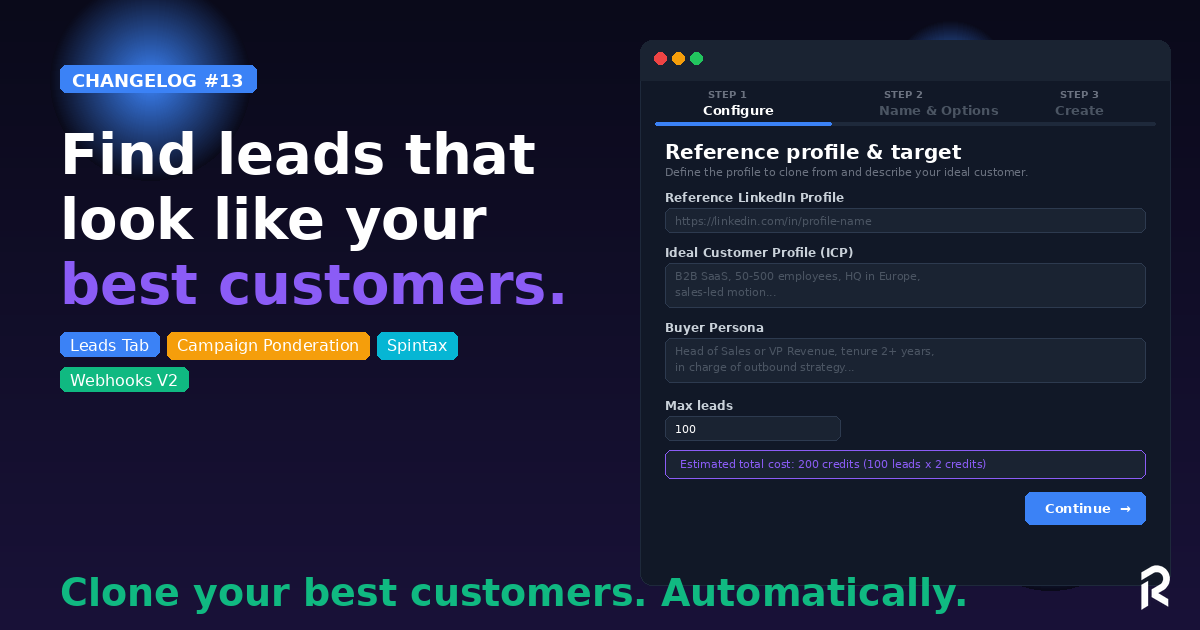
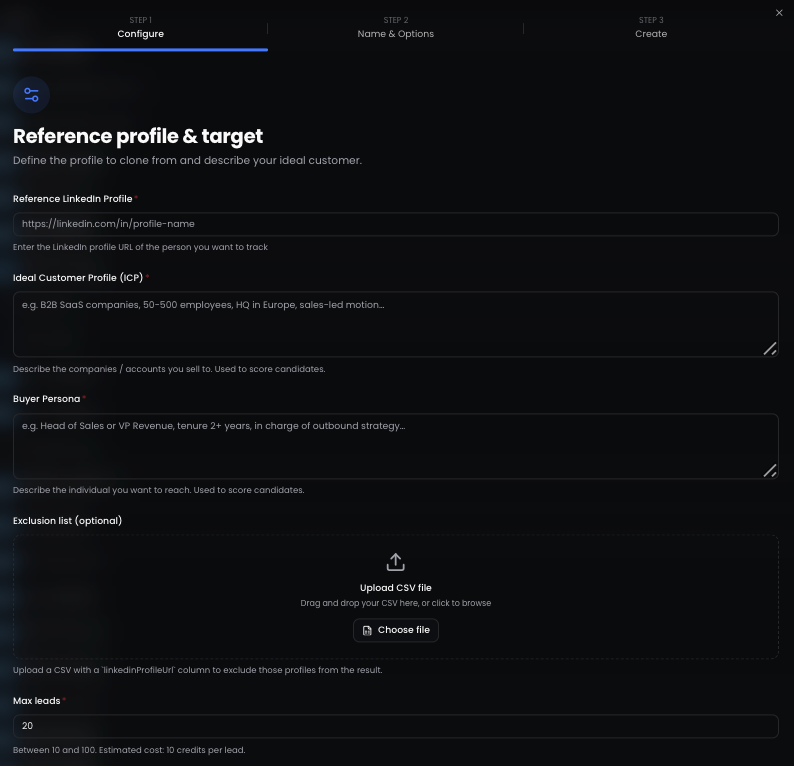
Give ReactIn a LinkedIn profile URL, describe your ICP and Buyer Persona, and we'll find up to 100 leads that match. Automatically.

Here's how it works:

  • Enter a reference LinkedIn profile (a top customer, a competitor's founder, an industry leader)

  • Describe your ICP (e.g. "B2B SaaS companies, 50-500 employees, HQ in Europe, sales-led motion")

  • Describe your Buyer Persona (e.g. "Head of Sales or VP Revenue, tenure 2+ years, in charge of outbound strategy")

  • Upload an exclusion list (optional: CSV of your existing customers to exclude)

  • Set max leads (10 to 100) and let ReactIn do the work ๐Ÿช„

Credit cost: 10 credits per lead. Full transparency, visible before you hit "Continue." And a few moments later, youโ€™ll get all your new, fresh leads coming from our own โ€œwaterfall scraping machineโ€ โš™๏ธ

This is intent-based prospecting taken to the next level. You're cloning your best customers.


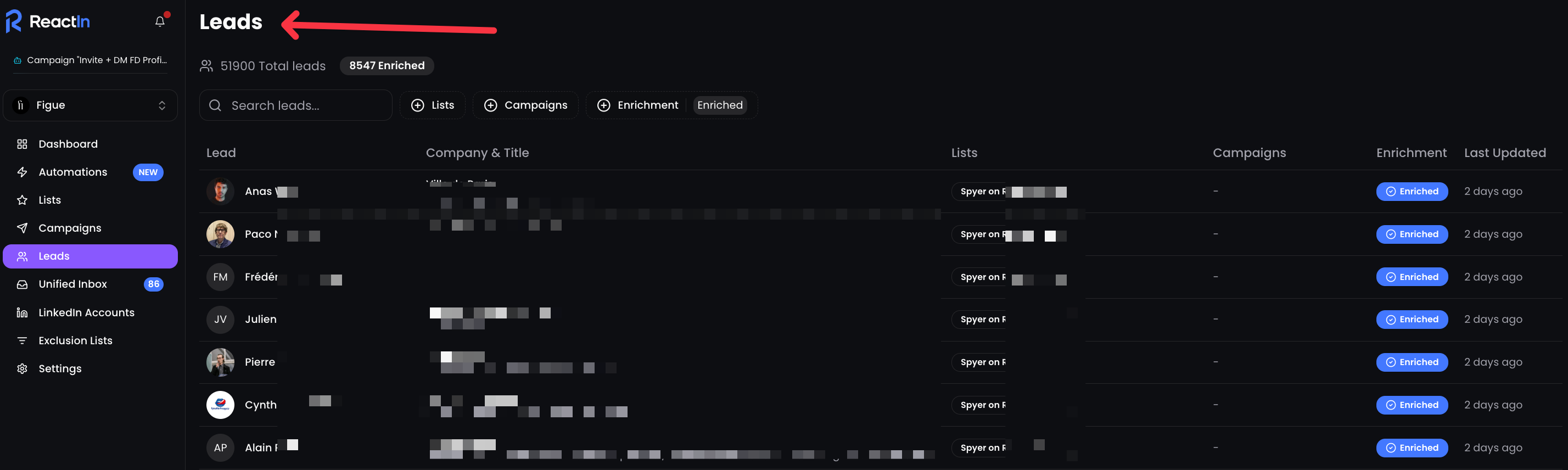
2๏ธโƒฃ NEW: Leads Tab

You now have a unified view of every lead across all your lists.

All your leads, enriched or not. From all your lists. All searchable, filterable, and organized.

Filter by list, by campaign, by enrichment status. See which lists and campaigns each lead belongs to. Track enrichment progress at a glance.

No more switching between lists to find a lead. One tab. Full visibility.


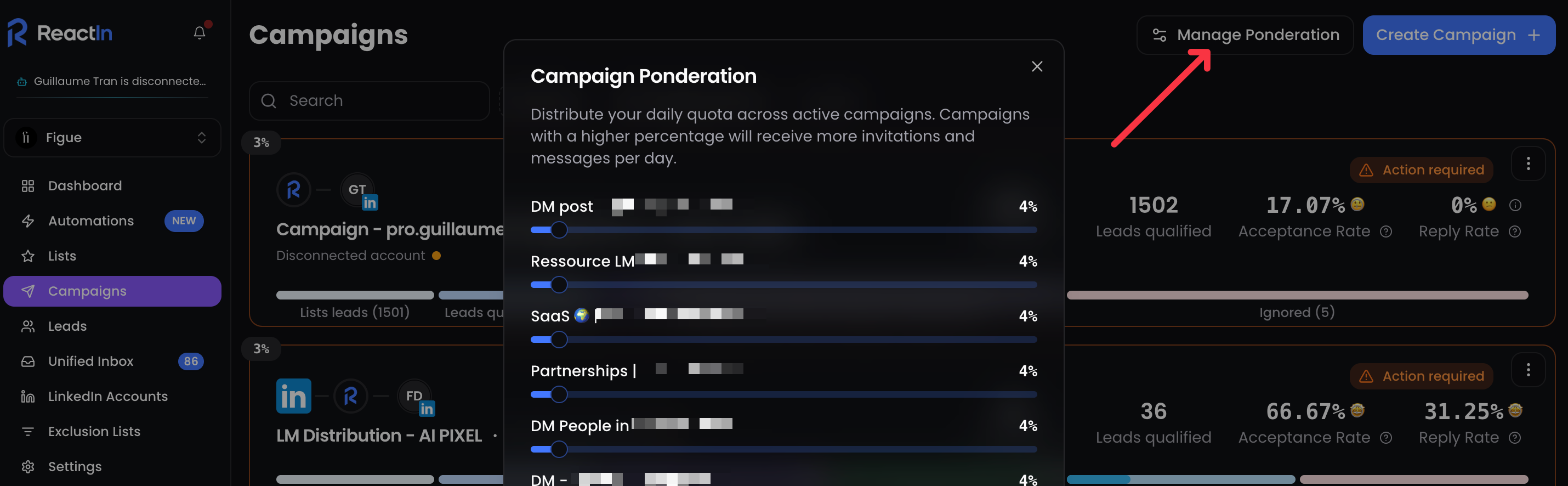
3๏ธโƒฃ Campaign Ponderation

Running 15+ campaigns at the same time? Now you control how your daily quota is distributed across them.

Manage Ponderation lets you assign a weight (%) to each active campaign. Campaigns with a higher percentage get more invitations and messages per day.

Your most important campaigns get priority. Your experimental ones run in the background. You decide.

Perfect for agencies and power users managing multiple accounts with dozens of active campaigns.


โš™๏ธ Improvements

  • New Webhook Events: "Lead Updated" and "Invitation Sent" are now available as webhook triggers, plus the ability to send a test payload before going live.

  • Message Preview: See exactly how your message will look for a specific lead before sending. Variables get replaced with real data. No more guessing.

  • Spintax in Messages: Use {Hey|Hi {FirstName}|Hello} to randomly vary your messages. Each lead gets a slightly different version. More human, better deliverability.

  • Timezone per LinkedIn Account: Set the timezone directly from your LinkedIn Accounts settings. Your messages land during business hours, wherever your prospects are.


๐Ÿ‘‰ Try it now in your dashboard ๐Ÿ’™ How many lookalike leads are you going to generate?

Franรงois & The ReactIn Team โšก

NewImproved

Earlier updates